Programming

Programming

Hacking

Hacking

Hardware

Hardware

Anti Virus

Anti Virus
Showing posts with label News And Information. Show all posts

Kode Rahasia Ponsel Nokia

Mar 10, 2010


Wah visitor udah lama nih ngga posting tapi tenang sekarang ane akan posting sesuatu yang pasti nya akan mencengankan visitor sekalian :thumbup: Ok pada posting kali ini , ane akan membahas kode kode rahasia pada nokia :matabelo: fungsi nya banyak dari melihat no handphone yang di private dan lain lain :genit: Langsung saja gan :ngacir2


Berikut ini adalah kunci kode tombol rahasia yang dapat anda jalankan sendiri dengan mengetiknya di keypad hp ponsel anda yang bermerek Nokia baik yang cdma maupun yang gsm ;


1. Melihat IMEI (International Mobile Equipment Identity)
Caranya tekan * # 0 6 #

2. Melihat versi software, tanggal pembuatan softwre dan jenis kompresi software
Caranya tekan * # 0 0 0 0 #
Jika tidak berhasil coba pencet * # 9 9 9 9 #

3. Melihat status call waiting
Caranya tekan * # 4 3 #

4. Melihat nomor / nomer private number yang menghubungi ponsel anda
Caranya tekan * # 3 0 #

5. Menampilkan nomer pengalihan telepon all calls
Caranya tekan * # 2 1 #

6. Melihat nomor penelepon pada pengalihan telepon karena tidak anda jawab (call divert on)
Caranya tekan * # 6 1 #

7. Melihat nomor penelepon pada pengalihan telepon karena di luar jangkauan (call divert on)
Caranya tekan * # 6 2 #

8. Melihat nomor penelepon pada pengalihan telepon karena sibuk (call divert on)
Caranya tekan * # 6 7 #

9. Merubah logo operator pada nokia type 3310 dan 3330
Caranya tekan * # 6 7 7 0 5 6 4 6 #

10. Menampilkan status sim clock
Caranya tekan * # 7 4 6 0 2 5 6 2 5 #

11. Berpindah ke profil profile ponsel anda
Caranya tekan tombol power off tanpa ditahan

12. Merubah seting hp nokia ke default atau pabrikan
Caranya tekan * # 7 7 8 0 #

13. Melakukan reset timer ponsel dan skor game ponsel nokia
Caranya tekan * # 7 3 #

14. Melihat status call waiting
Caranya tekan * # 4 3 #

15. Melihat kode pabrik atau factory code
Caranya tekan * # 7 7 6 0 #

16. Menampilkan serial number atau nomer seri hp, tanggal pembuatan, tanggal pembelian, tanggal servis terakhir, transfer user data. Untuk keluar ponsel harus direset kembali.
Caranya tekan * # 92702689 #

17. Melihat kode pengamanan ponsel anda
Caranya tekan * # 2 6 4 0 #

18. Melihat alamat ip perangkat keras bluetooth anda
Caranya tekan * # 2 8 2 0 #

19. Mengaktifkan EFR dengan kualitas suara terbaik namun boros energi batere. Untuk mematikan menggunakan kode yang sama.
Caranya tekan * # 3 3 7 0 #

20. Mengaktifkan EFR dengan kualitas suara terendah namun hemat energi batere. Untuk mematikan menggunakan kode yang sama.
Caranya tekan * # 4 7 2 0 #

21. Menuju isi phone book dengan cepat di handphone nokia
Caranya tekan nomer urut lalu # contoh : 150#

22. Mengalihkan panggilan ke nomor yang dituju untuk semua panggilan
Caranya tekan * * 2 1 * Nomor Tujuan #

23. Mengalihkan panggilan ke nomor yang dituju untuk panggilan yang tidak terjawab
Caranya tekan * * 6 1 * Nomor Tujuan #

24. Mengalihkan panggilan ke nomor yang dituju untuk panggilan ketika telepon hp anda sedang sibuk
Caranya tekan * * 6 7 * Nomor Tujuan #

Keterangan Tambahan :
- Kode diinput tanpa spasi
- Ada kode-kode nokia yang berlaku pada tipe tertentu saja

Sory banget kalau
:repost:
tapi seengga nya berguna kan buat visitor hehe
:Peace:


windows 7 " God Mode "

Jan 24, 2010

sudah sekian lama tidak posting sekarang ane mau post lagi nih ....

yah mengenai windows seven karena info nya masih sedikit di blog ini jadi ane mau post lagi

sekarang kita mau membahas mengenai windows seven "god mode"

pasti visitor bertanya tanya langsung kita simak aja yang berikut ini .....


apa sih .... windows 7 God mode tuh? God mode feature adalah salah satu fitur windows 7 berupa extended control panel yang berisi banyak pengaturan system yang tidak ada pada control panel via GUI.

Ok terus bagaimana cara nampilin feature GOD MODE ini?

1. Buat New Folder (dimana aja boleh)
2. Klik Kanan Rename
3. Rename dengan: GodMode.{ED7BA470-8E54-465E-825C-99712043E01C}

maka folder tersebut akan berubah menjadi folder kontrol panel God mode.

sekian dari ane pada postingan kali ini ... tunggu update berikut nya : )


Tips menggoreng Kentang dengan motherboard dan processor + Windows

Dec 12, 2009

Sebetul nya cara ini tidak ali rekomendasikan bagi yang masih punya kompor tapi berhubung mau ekperimen bisa di coba kok ....

hal ini ali pastikan adalah benar jadi ngga mungkin sotomie, langsung saja ...

Pertama Visitor bisa siapkan Minyak terlebih dahulu ...


Tuangkan kedalam bejana , bahasa keren nya wajan - - "


Tunggu beberapa saat sampai ngumpruk


Supaya cepat panas ali rekomendasikan sambil nyetel trailer dari sora aoi hha


Setelah agak mendidih masukan kentang ngga ada kentang singkong pun jadi ngga ada singkong cicak pun jadi ..


Tunggu sampai agak ke kuning kuningan sambil di aduk terus...


so ... tiriskan kentang goreng motherboard pun siap di sajikan mudah bukan


resep dapat di temui di majalah pc world edisi mendatang :D ...

note :

ali tidak bertanggung jawab tentang apa yang bakal terjadi
hal yang paling fatal saat nonton sora aoi birahi memuncak minyak panas eh lagi coks nyenggol minyak kena si stuart udah deh ali ngga tau /kabur


narasumber : Vehn


Mahoo - Music Engine , cari mp3 Gratis lebih cepat

Dec 4, 2009

Setelah ali menuangkan inspirasi dan glora akhir nya situs yang sudah 3 minggu ali kembangkan akhirnya selesai juga.

merupakan situs yang mengefisienkan waktu visitor dalam mencari lagu, jadi visitor tidak usah susah susah dan repot lagi untuk mencari lagu dengan direct url yang tepat, kadang visitor menemui url yang sudah tidak aktif lagi atau bertemu dengan torent - torent yang tidak jelas untuk itulah tujuan situs ini ali buat.

situs ini kemungkinan besar masih banyak "vulnerability" karena bikin nya yang asal - asalan + sambil buffer megaporn jadi agak - agak ngga berkah gitu deh :p,dalam tahap penyempurnaan ali mau konsultasi dulu ke forum tecon untuk keamanan nya.

bagi yang penasaran bisa langsung kunjungi dengan

Click Here [ Mahoo - Music Engine ]


MySpace Music Launches in the UK

Dec 3, 2009

MySpace Music takes on Spotify in one of its most entrenched markets, the UK
Enlarge picture

To take on Spotify in one of its most entrenched markets


Things are as messy as ever in the music streaming business yet most people are surprisingly determined in pushing forward. MySpace is now launching its Music service in the UK after being available in the US and recently in Australia and New Zealand. The free streaming service will offer millions of songs, though no exact figure was provided, and tens of thousands videos taking Spotify, which is very popular in the country, head on.


“The UK is renowned for its passionate and committed music fans, and MySpace has had a rich history with its artist community. Acts like Arctic Monkeys and Lily Allen embraced MySpace from the outset, and are now synonymous with the site. I’m thrilled to announce MySpace Music is now officially available to all artists and music fans in the UK,” MySpace Music president Courtney Hold writes.

MySpace Music will be completely free in the UK with an ad-supported revenue model. There will be ads in between songs as all the advertising will be on the site itself. Of course, this is true for most websites in the world so it's not exactly surprising. However, Spotify, which will likely be its greatest competitor in the UK, does insert audio ads between tracks in the free version of the service so this may very well be MySpace's biggest draw.

MySpace has support from all the major labels, as well as from the usual array of indie labels, but this is basically standard for any music streaming service these days. It also signed a deal with PRS for Music, an UK rights group which claims to represent some 65,000 artists in the country, and any of its members can receive royalties from the songs they have on MySpace.

Still, it probably has an up-hill battle in the UK where Spotify is pretty well entrenched. It does have a huge social network to leverage of course, but MySpace has been bleeding users in the UK just like everywhere else. Back home, in the US, there is talk that MySpace Music may be forced to drop the free service which proved unprofitable so far after pressure from the music labels, the same pressure which has delayed Spotify's launch in the US.


Test the Brand-New Google Homepage Redesign Yourself – Screenshots

Nov 28, 2009

With a simple JavaScript trick


Google is always tweaking the design of its products even, or especially, that of its search engine. The site has evolved in time but for the most part the changes have been subdued and discrete. Not anymore though, Google is planning a major revamp of its search engine, by Google standards anyway, promising to be the biggest single redesign to date. The company is already testing the design with a number of users, but the rest of us will have to wait until next year to get to see it in action. However, if you just can't wait that long, there's a little trick you can use to get into the trial.

The trick involves modifying the cookies Google stores on your computer to keep various settings and data. This sounds more complicated than it really is, all you need to do is copy and paste the code below into your browser's address bar. You need to sign out of your Google account either before or after pasting the code and then you should see the brand-new design regardless of whether you're signed in or not.

After this, the new design is all yours in all its Technicolor glory. It's still the same minimalist Google design that we all know and love, but it's gotten a bit livelier. A lot livelier actually, thanks to the small icons adorning the categories in the now-permanent sidebar, but especially to the bright, new blue, which is everywhere from the links to the logo.

There's a more detailed account of the features and changes in the new design over here. Moreover, if you want to check out the “disappearing” homepage Google has also been testing for a while, you can read about it here. And, finally, if you don't want to mess with your browser's cookies you can check out some screenshots below.

Here's the code you need to copy and then paste in the address bar:

javascript:void(document.cookie="PREF=ID=20b6e4c2f44943bb:U=4bf292d46faad806:TM=1249677602:LM=1257919388:S=odm0Ys-53ZueXfZG;path=/; domain=.google.com");


The new Google homepage
Enlarge picture
The main search results page in Google Search
Enlarge picture
The news filter in Google Search
Enlarge picture
The video section in Google Search
Enlarge picture

Symantec Online Store Hacked

Nov 27, 2009

User passwords and product serial numbers potentially exposed


http://www.logitech.com.au/Images/Other/Symantec%20big.JPG

A self-proclaimed grey-hat hacker has located a critical SQL injection vulnerability in a website belonging to security giant Symantec. The flaw can be leveraged to extract a wealth of inf
ormation from the database including customer and admin login credentials, product serial numbers, and possibly credit card information.

The flaw was found by a Romanian hacker going by the online handle of Unu, according to whom an insecure parameter of a script from the pcd.symantec.com website, allows for a blind SQL injection (SQLi) attack to be performed. In such an attack, the hacker obtains read and/or write permission to the underlying database of the vulnerable website.

During a regular SQLi attack, the result of a rogue SQL query is displayed inside the browser instead of the normal web page output. Meanwhile, in a blind SQL injection, the query executes, but the website continues to display normally, making it much more difficult to extract information.

Symantec PC Doctor database server information
The content of the pcd.symantec.com website is written in Japanese, but from what we could determine, it serves a product called Norton PC Doctor. Accessing most of the website's sections requires authentication, and in order to exploit the blind SQLi vulnerability, the hacker had to use a few specialized tools. The Web server appears to be running Windows Server 2000 as operating system, Microsoft IIS 6.0 with ASP support and Microsoft SQL Server 2000 as database back-end.

From the screen shots released by Unu there are many potentially interesting databases, but the one he chose to look at is called "symantecstore." One of the tables in this database is named "PaymentInformationInfo" and contains columns such as BillingAddress, CardExpirationMonth, CardExpirationYear, CardNumber, CardType, CcIssueCode, CustomerEmail, CustomerFirstName, CustomerLastName or SecurityIndicator.

Database listing on Symantec PC Doctor server
Unu claims that his interest is only to point out security issues and not misuse any data. Therefore, according to him, he did not attempt to extract any information from this table. Instead, he focused on another one called TB_MEMBER, which contains 70,356 records.

For demonstration purposes, he extracted 6 of these entries at random, revealing customer names and login credentials with the passwords stored in plain text; a major security oversight. The hacker also notes that passwords for the accounts in a different table called TB_EMPLOYEE are also stored in a similar insecure way.

A third table Unu chose to investigate is called TB_ORDER and contains columns such as ProductName, ProductNumber, SaleAmount and SerialNumber. There are 122,152 entries in the SerialNumber column.

This is not the first time when Unu scrutinizes the security of websites belonging to antivirus vendors. His previous targets includes Kaspersky and Bitdefender. Some months back, he even disclosed a vulnerability affecting a different Symantec website. The AV company eventually played down its impact.

At the end of his most recent disclosure, Unu mentions his previous attack against Kaspersky's US online store website. "There was fair play, they quickly secured vulnerable parameter, and even if at first they were very angry at me, finally understood that I did not extract, I saved nothing, I did not abused in any way by those data found. My goal was, what is still, to warn. To call attention [sic.]," the hacker writes on his blog.

Note: We have alerted Symantec about the potential security breach. We will update this article when/if more information becomes available.

Update: In an e-mail to Softpedia, Symantec has confirmed the existence of a vulnerabiliy in the pcd.symantec.com. Here is the full statement we received:

"A SQL injection vulnerability has been identified at pcd.symantec.com. The Web site facilitates customer support for users of Symantec's Norton-branded products in Japan and South Korea only. This incident does not affect Symantec customers anywhere else in the world.

"This incident impacts customer support in Japan and South Korea but does not affect the safety and usage of Symantec's Norton-branded consumer products. Symantec is currently in the process of updating the Web site with appropriate security measures and will bring it back online as soon as possible. Symantec is still investigating the incident has no further details to share at this time."

Google Wave

Oct 31, 2009


Ada yang sudah tau google wave ? kabar nya inilah suatu andalan google berikut nya karena banyak sekali developer - developer yang turut mendukung pembuatan google wave.

walau google masih merahasiakan google wave tetapi situs google wave sudah di buka untuk public, hanya saja masih seperti survey sebelum mendaftar dan harus menunggu email undangan sebelum dapat menggunakan nya.


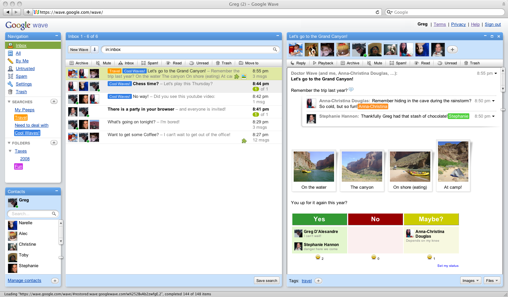
apabila dilihat dari gambar di bawah ini

Image


Google wave memiliki beberapa fasilitas seperti mail,chat,games,wall to wall,update status dan lain nya.

Image

tidak heran apabila nanti orang orang bonavit akan meninggalkan facebook dan beralih ke google wave , disamping pendaftaran nya yang sulit pasti sedikit alay - alay :D yang terjun ke google wave


Jenis - Jenis licensi microsoft

Oct 30, 2009


Pada topik pembicaraan kali ini ane akan menerangkan jenis jenis licensi microsoft yang segunung jenis nya ..

  • FPP = Full Product Package, satu box berisi CD install Ms. Windows
(mungkin juga dilengkapi dengan buku manual), kemasan ber-hologram dan ada seri-nomornya. Boleh secara bergantian (hanya sah dipakai pada satu PC/Notebook) diinstalkan kepada komputer lain (dengan catatan instalan Ms.Windows di komputer sebelumnya dihapus), tidak melekat pada satu komputer tertentu, tidak melekat kepada pribadi pemilik atau organisasi pemiliknya,dapat dijual kembali kepada orang lain. Harga paling mahal.

  • OEM = Original Equipment Manufacturer, biasanya dijual bersama komputer baru, dan semestinya hanya dijual kepada toko perakit komputer (tidak langsung kepada pembeli), kemudian perakit menjualnya bersama dengan
komputernya (bundle komputer dan OS). Toko / perakit komputer bisa menambahkan Logo atau kata promosi lain pada halaman My Computer => Properties karena ada bawaan software untuk menambahkan logo tersebut. Licensi ini melekat pada komputer, artinya kalau komputernya rusak
(terutama
motherboardnya) sehingga harus ganti motherboard atau komputer maka lisensi
menjadi hangus dan tidak berlaku / tidak sah untuk diinstalkan pada komputer yang kedua. (Biasanya tidak bisa diregistrasikan online bila diinstal pada komputer lain). Harga lisensi ini biasanya paling murah.

  • OLP = Open License Package, biasanya hanya berupa selembar kertas licensi
(ukuran A4) untuk suatu perusahaan atau organisasi yang membeli beberapa
unit software
(mis. 5 unit Ms. Windows untuk 5 PC, plus 5 unit Ms. Office
untuk 5 PC),
sehingga sebuah perusahaan hanya perlu se lembar licensi untuk

semua produk software yang dipakai
(dengan dicantumkan jumlah unit PC untuk
setiap judul software).
Kemudian pembeli bisa membeli hanya satu Media CD

(CD untuk Install) untuk diinstalkan pada beberapa PC sesuai dengan jumlah
unit PC yang tercantum dalam kertas lisensi tersebut. License software
tersebut melekat pada nama perusahaan
(apabila dipindah-tangankan bisa lapor
ke Microsoft untuk diubah nama organisasinya). Keuntungannya kalau suatu PC rusak bisa diinstalkan pada PC penggantinya, atau pun jika tidak rusak,
license boleh dipindahkan ke PC lain selama jumlah total PC yang terinstal
tidak melebihi jumlah unit yang tercantum pada license. Harga hampir sama
dengan OEM tapi kadang lebih mahal daripada OEM karena OLP lebih fleksibel.
Pada OLP tidak tersedia license Windows melainkan yang ada adalah Windows
upgrade (beli dulu minimal Windows Starter Pack OEM kemudian diupgrade
dengan Windows Business / Professional Upgrade OLP).

  • OLV = Open License Value Pack, mirip OLP, biasanya untuk suatu perusahaan
yang mengangsur licensinya selama 2 atau 3 tahun, sebelum angsuran lunas
dianggap sewa pakai dan kalau sudah lunas menjadi milik perusahaan.

  • Enterprise Agreement = license berupa kertas untuk perusahaan besar,
persyaratan biasanya minimal 200 unit atau lebih (mis. 100 unit Windows dan
100 unit Office dihitung menjadi 200 unit).

Untuk OLP, OLV dan Enterprise Agreement tersedia harga khusus untuk lembaga
pendidikan (Academic Edition) dan sosial (yang berizin = Charity Edition).

  • School Agreement = license untuk sekolah SMA ke bawah, bersifat langganan
tahunan (annual subscription). Boleh dipakai oleh lembaga, guru dan siswa
selama di sekolah. Ada rumus untuk menghitung jumlah unitnya yang dilakukan
authorized reseller setelah disurvey atau pihak sekolah mengisi questionair.

  • Campus Agreement = license untuk perguruan tinggi, bersifat langganan
tahunan (annual subscription). Boleh dipakai oleh lembaga, dosen dan
mahasiswa selama di kampus. Ada rumus untuk menghitung jumlah unitnya yang
dilakukan authorized reseller setelah disurvey atau pihak sekolah mengisi
questionair.

Untuk School dan Campus Agreement tersedia Work-At-Home option untuk
Siswa/Mahasiswa maupun Guru/Dosen. Untuk Siswa / Mahasiswa bisa diconvert
menjadi license permanent setelah dia meninggalkan sekolah / kampus dengan
tambahan sedikit biaya yang dibayar oleh siswa / mahasiswa tersebut.